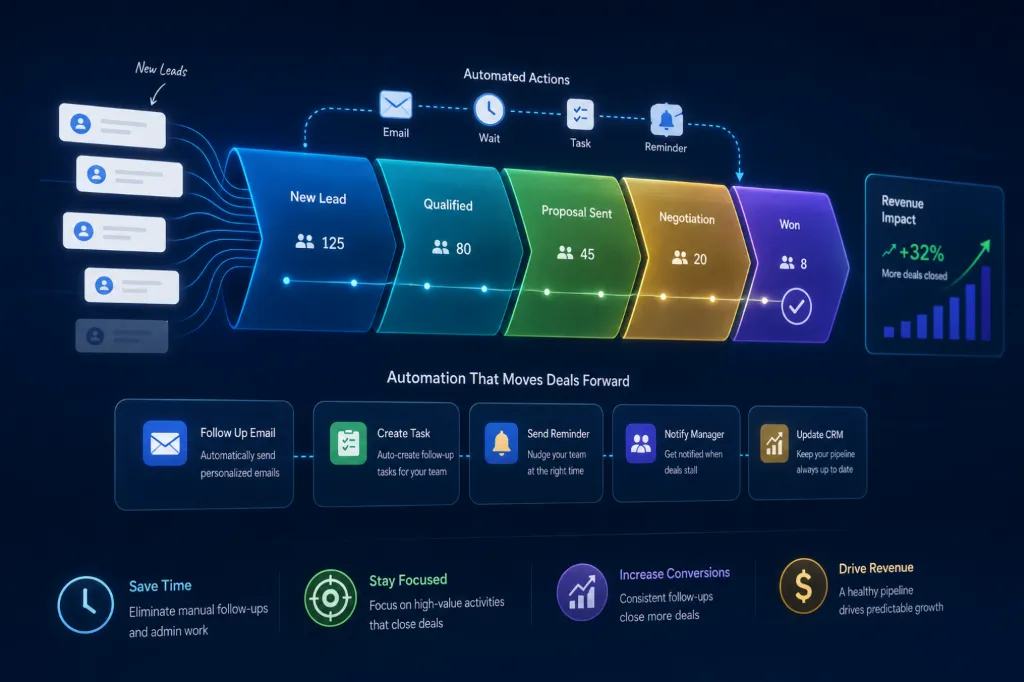
Sales teams waste enormous amounts of time on repetitive administrative tasks.
Updating CRMs manually. Sending follow-up emails. Tracking leads across spreadsheets. Scheduling calls. Managing reminders. Moving deals between stages.
These tasks consume valuable time that sales teams could spend actually closing deals.
This is why sales pipeline automation and CRM workflow automation have become essential for modern businesses.
At AZ Konnect, many businesses come to us asking:
The answer is simpler than most businesses expect.
Modern automation tools and AI systems now allow businesses to automate large portions of the sales process using no-code workflows, CRM integrations, and AI-powered systems.
In this guide, we’ll explain:
- what sales pipeline automation is
- how CRM automation works
- what parts of sales can be automated
- which tools businesses use
- how AI sales automation improves conversions
What Is Sales Pipeline Automation?
Sales pipeline automation refers to using software, AI systems, and workflow automation tools to automate repetitive sales processes.
Instead of sales teams manually handling every operational task, automation systems manage workflows automatically.
Examples include:
- lead assignment
- CRM updates
- follow-up reminders
- appointment scheduling
- sales notifications
- email sequences
- lead scoring
- reporting systems
The goal is to reduce manual work while improving speed, consistency, and lead conversion efficiency.
Because apparently humans decided the best use of skilled salespeople was making them copy-paste notes between tabs for six hours a day. A triumph of modern workflow design right there.
Why Businesses Automate Their Sales Pipeline
Without automation, sales teams often struggle with:
- inconsistent follow-ups
- lost leads
- outdated CRM records
- delayed responses
- operational bottlenecks
- poor sales visibility
Sales automation improves:
- response times
- organization
- lead tracking
- team efficiency
- customer experience
- conversion consistency
This allows businesses to scale sales operations more efficiently.
How Do Businesses Automate CRM Workflows?
CRM workflow automation connects sales systems together so repetitive actions happen automatically.
For example:
When a new lead submits a website form:
- create a contact in HubSpot
- notify the sales team in Slack
- assign the lead automatically
- send a follow-up email
- schedule a Calendly booking link
- move the lead into the CRM pipeline
All automatically.
This eliminates repetitive manual tasks while improving sales response speed.
What CRM Automation Tools Are Best?
Several tools are commonly used for sales pipeline automation.
HubSpot
HubSpot is one of the most popular CRM automation platforms.
Businesses use HubSpot for:
- lead tracking
- sales pipelines
- automated emails
- customer workflows
- reporting dashboards
- sales automation
It’s especially popular among growing businesses because it combines CRM management with marketing automation.
Salesforce
Salesforce is widely used by larger businesses and enterprise organizations.
It supports:
- advanced CRM systems
- complex automation workflows
- sales forecasting
- pipeline management
- enterprise reporting
Salesforce is powerful but often requires more setup and customization.
Pipedrive
Pipedrive is a sales-focused CRM designed around pipeline visibility and deal management.
Businesses use it for:
- visual sales pipelines
- activity tracking
- follow-up automation
- lead organization
It’s often considered beginner-friendly for sales teams.
Zapier
Zapier connects apps together using no-code automation.
For example:
- connecting HubSpot with Slack
- syncing Google Sheets
- triggering Mailchimp emails
- automating lead routing
Zapier simplifies workflow automation without requiring custom coding.
Make.com
Make.com provides more advanced workflow automation and visual automation mapping.
Businesses use it for:
- multi-step workflows
- advanced integrations
- CRM automations
- operational scaling
It becomes especially useful as automation systems become more complex.
Can AI Automate Sales Follow-Ups?
Yes.
AI sales automation is becoming one of the fastest-growing areas in sales operations.
Using tools powered by OpenAI and AI workflow systems, businesses can automate:
- lead qualification
- customer responses
- follow-up messaging
- sales summaries
- CRM notes
- support conversations
- appointment reminders
AI systems can also help prioritize leads based on behavior and engagement patterns.
This allows sales teams to focus more on high-value conversations rather than repetitive admin work.
What Parts of the Sales Process Can Be Automated?
Many sales workflows can now be automated.
Lead Capture
Automation tools can:
- capture website leads
- organize contact information
- assign sales reps
- trigger workflows instantly
Follow-Up Emails
Tools like Mailchimp and HubSpot automate:
- welcome emails
- nurture sequences
- appointment reminders
- sales follow-ups
Appointment Scheduling
Calendly automates:
- bookings
- confirmations
- reminders
- calendar syncing
This removes scheduling friction for both teams and prospects.
Internal Notifications
Slack integrations automate:
- deal alerts
- sales updates
- task reminders
- pipeline notifications
Reporting & Tracking
Businesses automate:
- sales dashboards
- KPI tracking
- conversion monitoring
- revenue reporting
Google Sheets and CRM dashboards are often integrated into these systems.
How Does Sales Automation Improve Conversions?
Automation improves conversions because:
- leads receive faster responses
- follow-ups become consistent
- sales reps stay organized
- leads don’t get forgotten
- workflows scale more efficiently
Speed matters heavily in modern sales.
Businesses that respond quickly often convert more leads than businesses with slower response systems.
What Is AI CRM Automation?
AI CRM automation combines traditional CRM systems with artificial intelligence.
Instead of simply storing lead information, AI systems can:
- summarize conversations
- analyze lead intent
- prioritize opportunities
- automate communication
- generate sales insights
- improve forecasting
AI-powered CRMs are helping businesses create smarter and more scalable sales operations.
The future of sales is basically teaching software to handle repetitive coordination while humans focus on persuasion and relationship building. Which is probably healthier for everyone involved, including the poor CRM dashboards being abused daily.
Signs Your Sales Pipeline Needs Automation
Your business likely needs sales automation if:
- leads are slipping through the cracks
- follow-ups are inconsistent
- CRM updates are manual
- sales reps waste time on admin work
- reporting feels disorganized
- response times are slow
- scaling sales feels difficult
These are common indicators that workflow optimization is needed.
Final Thoughts
Sales pipeline automation is no longer only for enterprise companies with massive technical teams.
Modern CRM automation tools and AI workflow systems now allow businesses to automate large portions of their sales operations quickly and efficiently.
Platforms like HubSpot, Salesforce, Zapier, Make.com, OpenAI, Pipedrive, Calendly, and Slack have made sales automation far more accessible than ever before.
Businesses that automate effectively often:
- respond faster
- convert more leads
- improve organization
- scale operations more efficiently
At AZ Konnect, we help businesses build scalable sales automation systems that reduce manual workload, improve operational efficiency, and strengthen conversion performance.